Super Screen Capture - Screen Capture Software
 
 
HomeProductsDownloadBuy Now Contact Us
 

Free Screen capture software

Introducing

Features and Benefits
System Requirements
Contacts Us
 

Getting started

Tools Bar

Full Screen Capture
Window and button capture
Region Screen Capture
Video Screen Capture
Audio Capture
Image Editing Tool
Options
 

Options

Interface Options
Hot Keys Options
Output Options
Video Options
Audio Options
 

Hot keys and Keyboard Shortcuts

Tools Bar Hot keys and Keyboard Shortcuts
Sharp Capture Hot keys and Keyboard Shortcuts
 
F.A.Q
How to purchase Super Screen Capture?
How to batch editing image?
How to customize interface?
How to customize Hot keys and Keyboard Shortcuts?
How to customize output mode?
How to capture full screen?
How to capture window screen?
How to capture quadrate area?
How to capture circular area?
How to capture polygonal area?
How to record screen video?
How to record sound?


Screen Capture - Hot Keys

Screen Capture

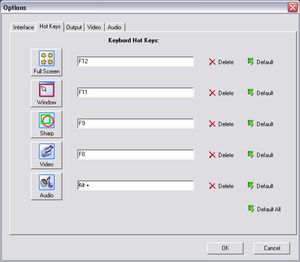
keyboard Hot Keys:
Customize hot key for any way.

Delete:
Delete the hot key.

Default:
Restore the hot key.

Default Hot Keys:

Name Default Hot Keys
Full Screen Capture F12
Window Capture F11
Sharp Capture F9
Video Capture F8
Audio Capture F7


Free Download Free Screen Capture Software


Copyright © 1997~ Zeallsoft. All rights Reserved. [Site Map] [Link]
Fun Photo Photo Editor Screen Capture Screen Recorder Photo Morph Magic Mirror Photo DVD